Can You Do AI Automation for Free? What the Free Plans Actually Allow
By Cee · 12 November 2026 · 5 min read
Yes, you can do AI automation for free, as long as the job is small. Free plans from tools like ChatGPT, Zapier, Make and n8n will happily run a handful of automations a day. What they won't do is run your whole business: the limits are low, the most useful features are often paid, and "free" still costs your time to set up and look after.
That makes free plans perfect for one thing: testing whether an automation is worth paying for. Below is exactly what each free option allows, checked against the tools' own pricing pages on 12 November 2026. Prices and limits change, so check the links before you rely on them.
If you're not sure what to automate yet, our list of AI automation examples for small businesses is a better place to start.
What "free" usually means in automation tools
Automation tools charge by how much work they do, not by how many people use them. Each tool counts it differently:
- Zapier counts tasks: each action an automation completes.
- Make counts credits: most actions use one credit, and some AI features use more.
- n8n counts executions: one full run of an automation, however many steps it has.
So the question is never just "is it free?" but "how many runs a month do I get, and what's switched off?"
The free options, one by one
ChatGPT Free: the AI part
ChatGPT's pricing page lists a Free plan with unlimited text chats and limited uploads, image creation and deep research. That's enough to draft replies, summarise messages and write descriptions by hand. The paid plans, Go and Plus, add more, and Plus adds scheduled tasks and custom GPTs, which help when you repeat the same job daily. ChatGPT prices its plans in local currency, so check the pricing page for what they cost where you are.
On its own, ChatGPT doesn't connect to your WhatsApp or your forms. You copy and paste. That still counts as a big time saving for many owners, but it isn't automatic.
Zapier Free: connecting your apps
Zapier's Free plan costs $0 and includes 100 tasks a month, two-step Zaps only, and checks for new data every 15 minutes. "Two-step" means one trigger and one action: "when a form is filled, add a row to my spreadsheet". You can't add a third step, such as an AI summary in the middle.
100 tasks is roughly three a day. Fine for a test, not for a busy enquiry inbox. The Professional plan starts at $19.99 a month billed yearly ($29.99 billed monthly) and unlocks multi-step Zaps.
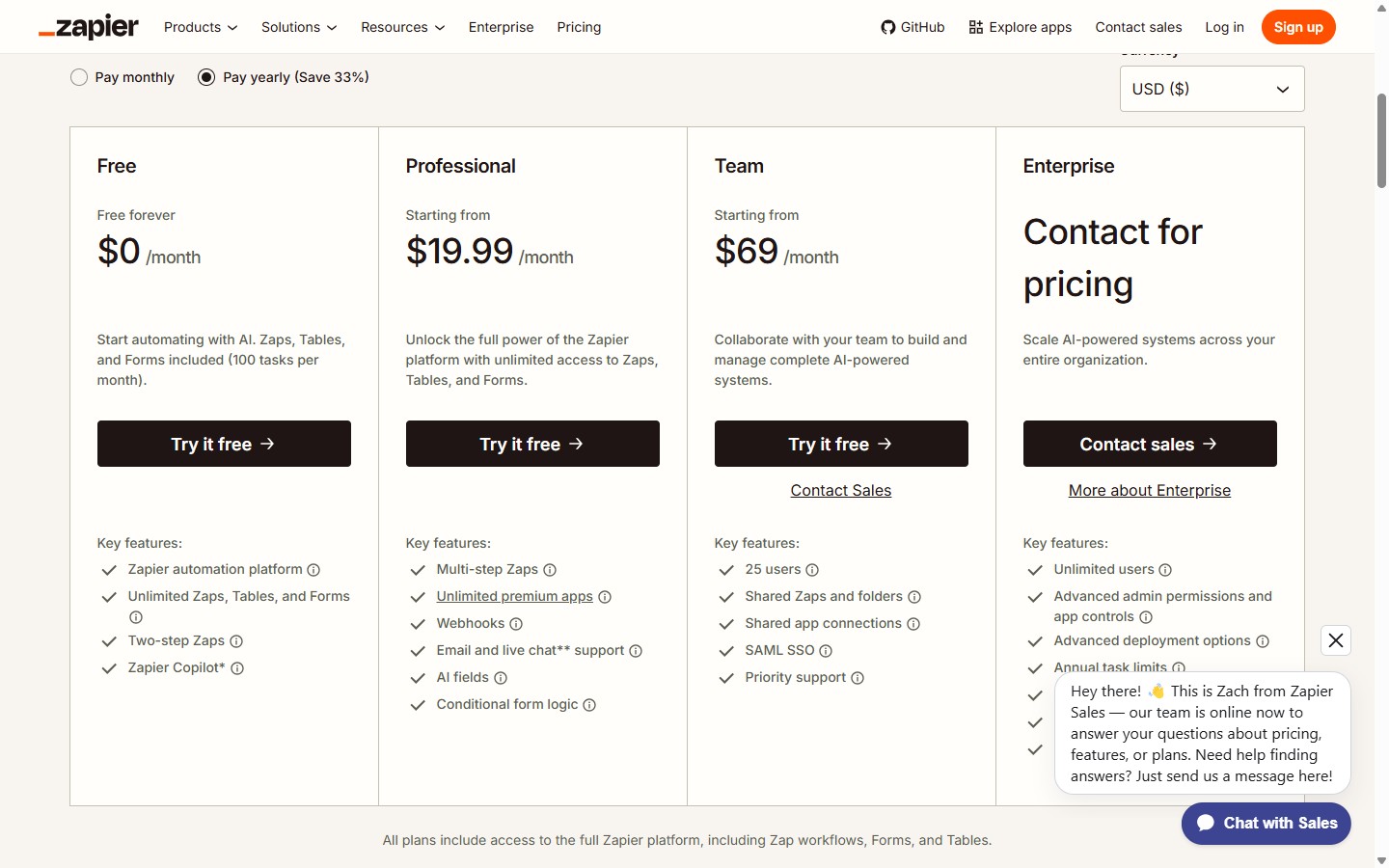 Zapier's Free plan includes 100 tasks a month and two-step Zaps. Screenshot: zapier.com/pricing, 12 November 2026.
Make Free: more room to experiment
Make's pricing page says the Free plan comes with 1,000 credits a month, and that most actions use one credit. Make also says it connects with more than 1,000 third-party apps. Unused credits expire at the end of each month, so you can't save them up.
Because Make lets you build scenarios with several steps, it's often the better free option for testing something with an AI step in the middle.
n8n: free if you host it yourself
n8n works differently. Its pricing page points to a standard self-hosted version on GitHub, which you can run on your own server. The software itself doesn't charge per run, but you need a server to put it on and someone comfortable setting it up, and that server costs money every month.
n8n's hosted plans start with Starter at $20 a month billed annually, with 2,500 workflow executions, and a free trial with no credit card required.
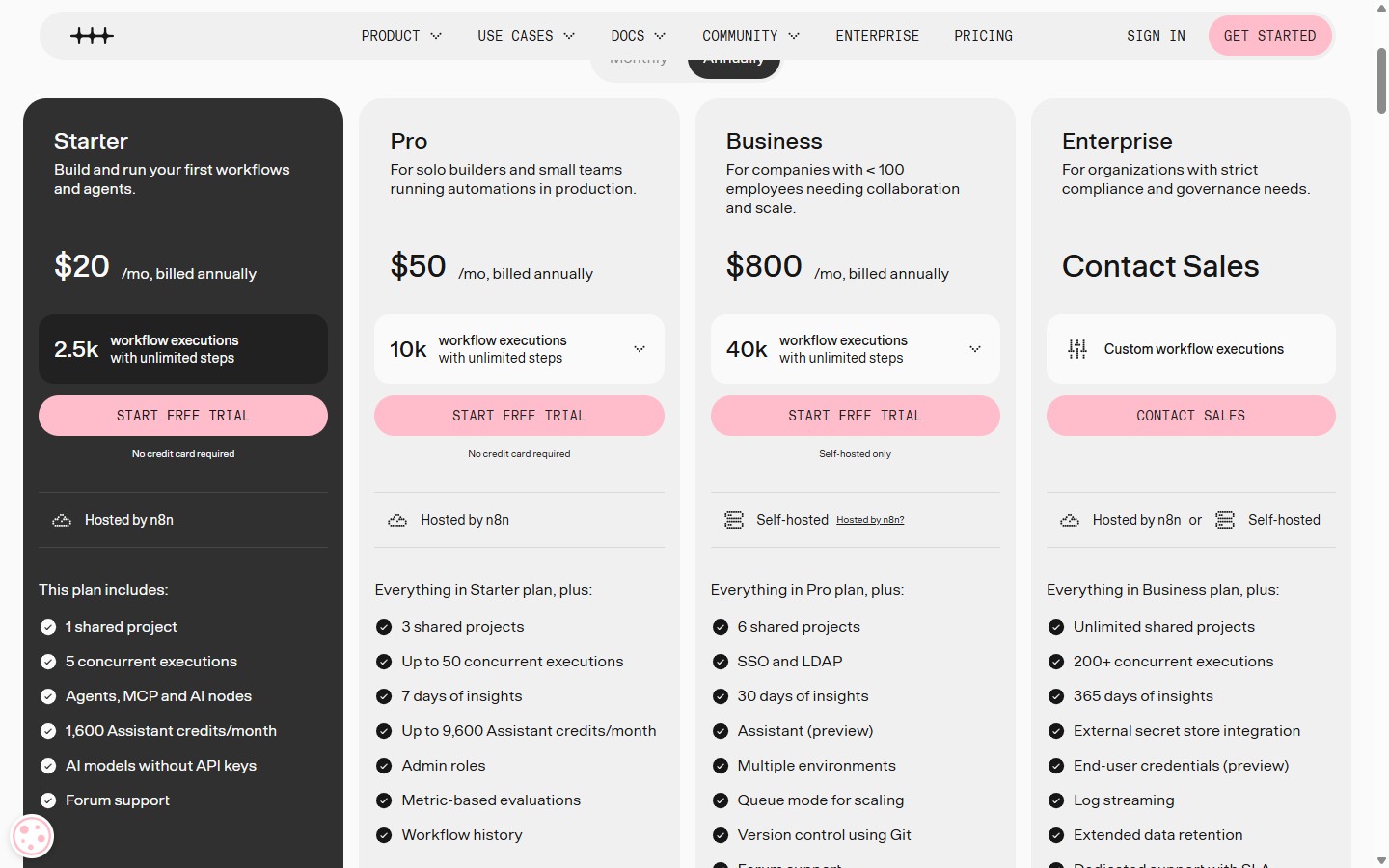 n8n's cloud plans are priced by workflow executions; the self-hosted version runs on your own server. Screenshot: n8n.io/pricing, 12 November 2026.
WhatsApp Business app: the free automation most people forget
The WhatsApp Business app is free to download from Google Play and the App Store, and its features page lists greeting messages, away messages, quick replies and labels. There's no AI in those features, but for a small business they cover a surprising amount: every new customer gets an instant welcome, after-hours messages get an honest "we'll reply in the morning", and your top ten answers are one shortcut away.
A quick comparison
| Tool | Free allowance | Biggest free limit | Cheapest paid step |
|---|---|---|---|
| ChatGPT | Free plan, unlimited text chats | No connection to your other apps | Go (priced by country) |
| Zapier | 100 tasks a month | Two steps only, 15-minute checks | Professional, $19.99/month billed yearly |
| Make | 1,000 credits a month | Credits expire monthly | See Make's pricing page |
| n8n | Self-hosted version on GitHub | You need a server and the skills to run it | Starter, $20/month billed annually |
| WhatsApp Business | Free app | No AI, phone-based | Not applicable |
The hidden costs of free
Free plans cost nothing on the bill, but they aren't free:
- Your time. Setting up, testing and fixing automations takes hours, especially the first time. Count those hours honestly.
- Silent failures. When a free plan runs out of tasks or credits mid-month, automations simply stop. If nobody notices, customers go unanswered.
- Missing features. The useful parts, like multi-step automations and faster checks, are usually behind the paywall.
- Data. Free AI tools may use your conversations differently from paid business plans. Check the settings before pasting customer details.
A sensible free setup to start with
For most small businesses, this costs nothing and is a real improvement:
- Install the WhatsApp Business app and turn on the greeting message, away message and five quick replies for your most common questions.
- Use ChatGPT Free to draft longer replies and quotes. Give it your price list and two example replies so it writes in your voice.
- Use Zapier Free or Make Free to send every website form entry into a spreadsheet, so no enquiry is lost.
Run that for a month. If you hit the free limits, that's good news: it means the automation is busy enough to be worth paying for.
When you're ready to go beyond free, our step-by-step guide on how to do AI automation for your business covers building it properly. Or, if the job is bigger than a weekend project, tell us about it. We built the automations for Topboyskicks and the whole platform for TokunboVerify, and we'll tell you straight whether a free setup is enough for you.