How to Do AI Automation for Your Business: A Plain-English Guide
By Cee · 12 November 2026 · 5 min read

To do AI automation for your business, you don't start with a tool. You start by writing down one job you repeat every week, exactly as you do it now. Then you decide which part needs a person, which part follows simple rules, and which part needs reading or writing. The AI only handles that last part. The tool comes after.
Skipping that order is why so many automations get switched off after a month. Someone signs up for an app, connects everything to everything, and three weeks later customers are getting the wrong messages.
This guide walks through the seven steps we follow when we build automations for clients, in plain language. If you haven't decided what to automate yet, start with our list of AI automation examples and come back.
Step 1: Write down the job exactly as it happens now
Take one job, say "replying to new enquiries", and write every step as if you were training a new staff member:
- A message arrives on WhatsApp or through the website form.
- I read it and work out what they want.
- I check the price list.
- I reply with the price and ask for their location.
- If they reply, I add them to my notebook or spreadsheet.
This list is the automation. Every line becomes either a rule, an AI step, or a human step. If you can't write the list, the job isn't ready to automate, because the software will be as confused as a new hire with no instructions.
Step 2: Count what it costs you
Work out how often the job happens and how long it takes. Twenty enquiries a week at five minutes each is 100 minutes a week, nearly seven hours a month. That number tells you how much effort the automation is worth, and it gives you something to measure against later.
Step 3: Split the job into rules, AI and people
Go back to your list and mark each line:
- Rules are the steps that never change: "when a form is filled, add a row to the spreadsheet." Ordinary automation tools do these reliably.
- AI steps are where something has to be read or written: understanding a messy message, pulling a phone number out of it, drafting a reply in your tone.
- People steps are where a mistake would be costly: confirming a price, handling a complaint, agreeing a delivery date.
Most good automations are mostly rules, with one or two AI steps and one human check. If your plan is mostly AI, it will be unpredictable.
Step 4: Choose the simplest tool that can do it
You don't need the most powerful tool. You need the one that covers your steps with the least setup. Roughly:
- Your phone's own apps for simple auto-replies. The WhatsApp Business app has greeting messages, away messages and quick replies built in.
- An AI assistant like ChatGPT for the reading and writing steps. ChatGPT has a free plan and paid plans called Go and Plus, priced in local currency. Plus adds scheduled tasks and custom GPTs, which help with repeat jobs.
- A connector tool like Zapier, Make or n8n to join your apps together so the rules run without you. We compare them in detail in a separate post.
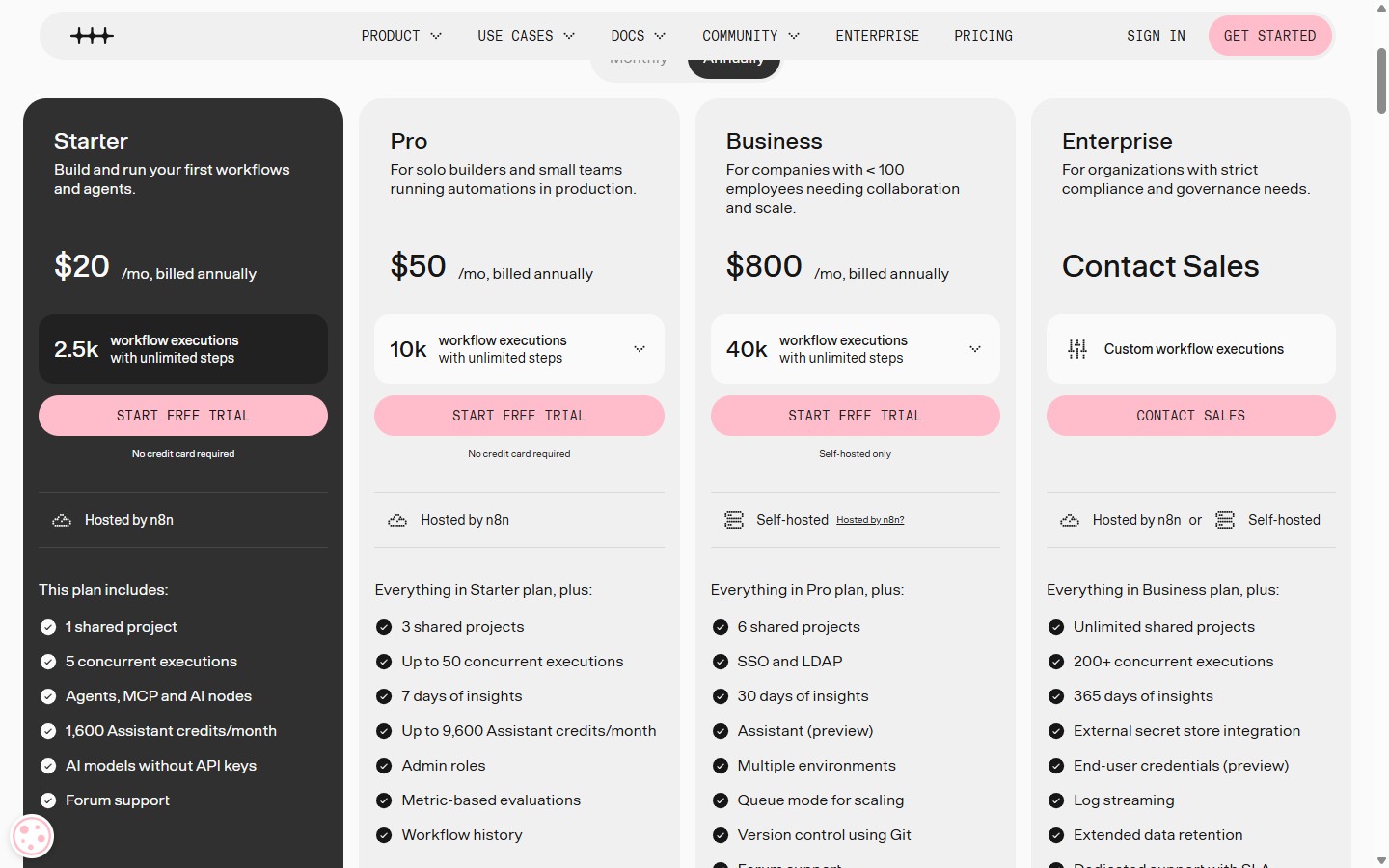 Connector tools like n8n charge by how much work they do each month. Screenshot: n8n.io/pricing, 12 November 2026.
Before you paste customer details into any AI tool, check what the tool does with that data and whether you can turn off training on your conversations. Your customers trusted you with their phone numbers, not the internet.
Step 5: Build the smallest version that works
Resist the urge to automate the whole job on day one. For the enquiry example, the smallest useful version might be:
- A new form entry arrives.
- The AI reads it and drafts a reply using your price list.
- The draft lands in your email or WhatsApp for you to approve and send.
That's it. No auto-sending yet. You've already cut the five minutes down to about one, and nothing can go out wrong without your eyes on it.
Step 6: Keep a human check where mistakes cost money
Decide where a person must approve before anything happens. A good rule: if a mistake could lose a customer, cost money, or be embarrassing in a screenshot, a human approves it. Everything else can run on its own once you trust it.
This matters more than it sounds. McKinsey's State of AI 2026 survey found that 80 percent of respondents say AI improved their productivity, but only 37 percent of organisations report any positive effect on profit. One reading of that gap: people save time on individual tasks, but the business doesn't change how work flows, so the savings leak away. Building the human check into the process is part of changing the flow.
Step 7: Run it for two weeks, then measure
Leave the automation running for two weeks and keep a simple note of what went wrong. Then compare against the number from step 2:
- Did the job take less time?
- Did any customer get a wrong or strange reply?
- Did you end up redoing the AI's work most of the time?
If the AI drafts are right most of the time, you can let the simplest cases send automatically and keep approving the rest. If you're rewriting most drafts, fix the instructions you gave the AI (usually by adding your price list, your tone and two or three example replies) before adding anything new.
Mistakes that kill AI automations
A few patterns we see again and again:
- Automating a messy process. If the job is done differently every time, the automation will copy the mess faster.
- No owner. Someone has to check the automation is still running. Tools change, passwords expire, and a silent failure can go unnoticed for weeks.
- Too many tools. Every extra app is another bill and another thing that can break.
- Letting AI promise things. Never let an automated message confirm a price, date or refund that a person hasn't approved.
Should you do it yourself or get help?
If the job is simple and you enjoy tinkering, do it yourself with free plans first. Our breakdown of AI automation for free shows how far that gets you.
If the job touches payments, customer records or more than two apps, it is usually cheaper to have it built once properly than to patch it every month. That's the work we do: for TokunboVerify our team built the whole platform, including an AI step that reads vehicle records and flags risks for buyers. Tell us which job eats your week, in your own words, and we'll tell you honestly whether it's worth automating.