Best AI Tool for Business Automation in 2026: Zapier, Make or n8n?
By Cee · 13 November 2026 · 5 min read
There is no single best AI tool for business automation. For most small businesses with no technical staff, Zapier is the easiest place to start. If you want more steps for less money and don't mind a slightly steeper learning curve, Make is usually better value. If you have a developer or want full control, n8n is the most flexible. And if your business already lives inside Microsoft 365, Power Automate is the natural fit.
All four handle the "plumbing": moving information between your apps. The "AI" part, reading and writing like a person, usually comes from a model like ChatGPT plugged into them. So the real choice is which tool connects your apps with the least fuss for your budget.
Every price below was checked on each tool's own pricing page on 12 November 2026. If you're still deciding what to automate, read our AI automation examples first.
What to look for before comparing tools
Before prices, answer three questions about your own business:
- Which apps must connect? Your form, your spreadsheet, your email, your invoicing tool, WhatsApp. Make a list. A tool is useless if it doesn't connect to the app you rely on.
- Who will look after it? If it's you, and you're not technical, ease of use matters more than power.
- How busy will it be? Ten automated actions a day and five hundred a day lead to very different bills.
Zapier: easiest to start
Zapier's whole pitch is simplicity: you pick a trigger app, pick an action app, and fill in the blanks. For non-technical owners, it's usually the quickest route to a working automation.
According to Zapier's pricing page, the Free plan includes 100 tasks a month and two-step Zaps only. The Professional plan starts at $19.99 a month billed yearly ($29.99 billed monthly) and adds multi-step Zaps, webhooks and AI fields. The Team plan starts at $69 a month.
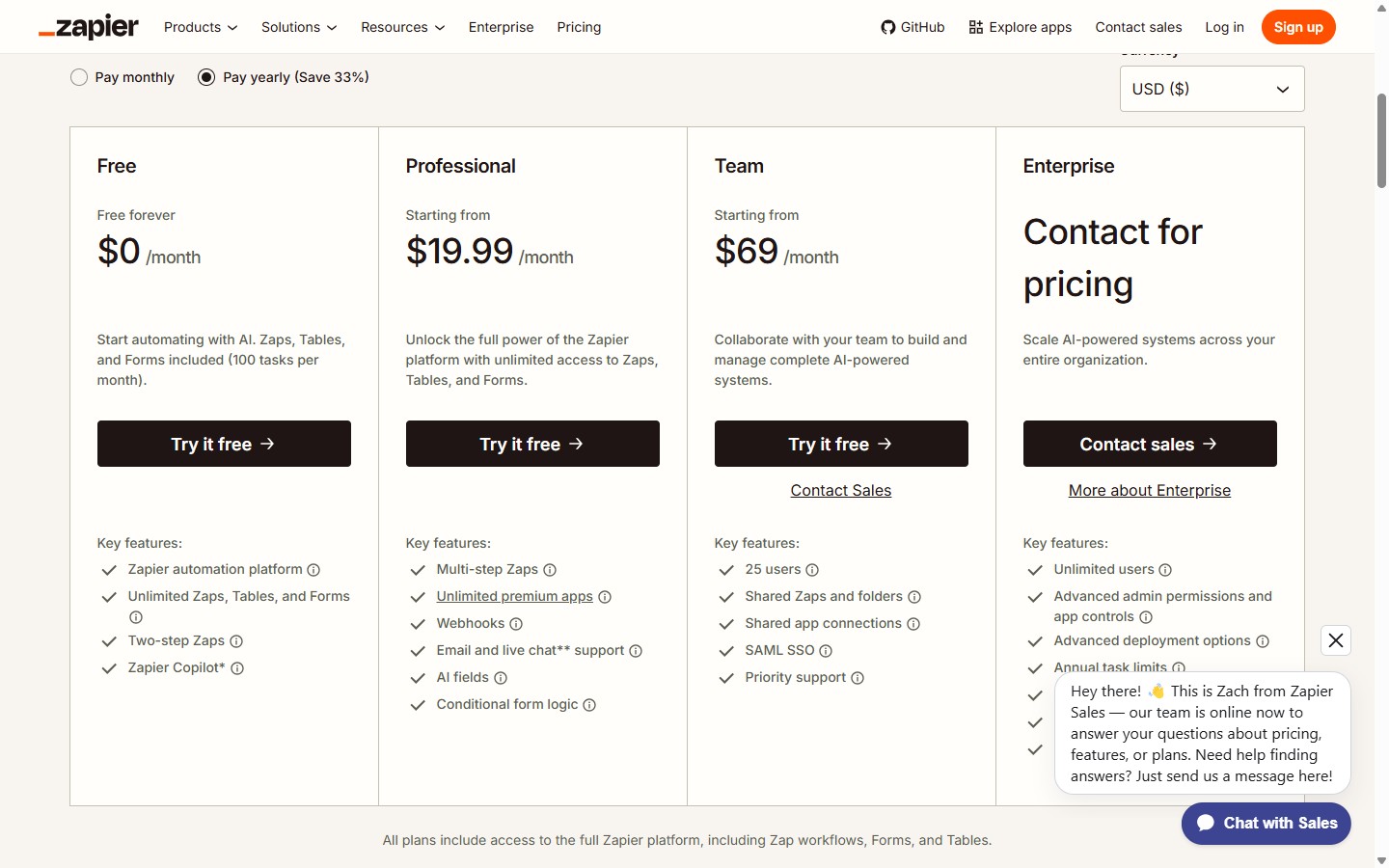 Zapier's plans, from Free to Enterprise. Screenshot: zapier.com/pricing, 12 November 2026.
Best for: owners who want something working this week without learning much. Watch out for: Zapier charges per task, so a busy automation with many steps can get expensive as you grow.
Make: more power for the money
Make uses a visual canvas where you drag steps and connect them with lines. It looks more technical than Zapier at first, but it handles branching ("if the customer is in Lagos, do this; otherwise do that") more naturally.
Make's pricing page says the Free plan comes with 1,000 credits a month, that most actions use one credit, and that Make connects with more than 1,000 third-party apps. Paid plans are called Core, Pro and Teams; Make notes that annual payment is cheaper than monthly.
Best for: businesses with several steps per automation and an owner or staff member willing to spend an afternoon learning. Watch out for: credits expire each month, and some AI features use more than one credit per action.
n8n: most flexible, needs some skill
n8n is the choice of many developers. It lets you build complex automations, add your own code, and run AI agents, and it can be hosted on your own server.
On n8n's pricing page, the cloud plans are priced by workflow executions, meaning full runs, regardless of how many steps each one has. Starter is $20 a month billed annually for 2,500 executions, Pro is $50 for 10,000, and Business is $800 for 40,000 and is self-hosted only. A standard self-hosted version is also available on GitHub.
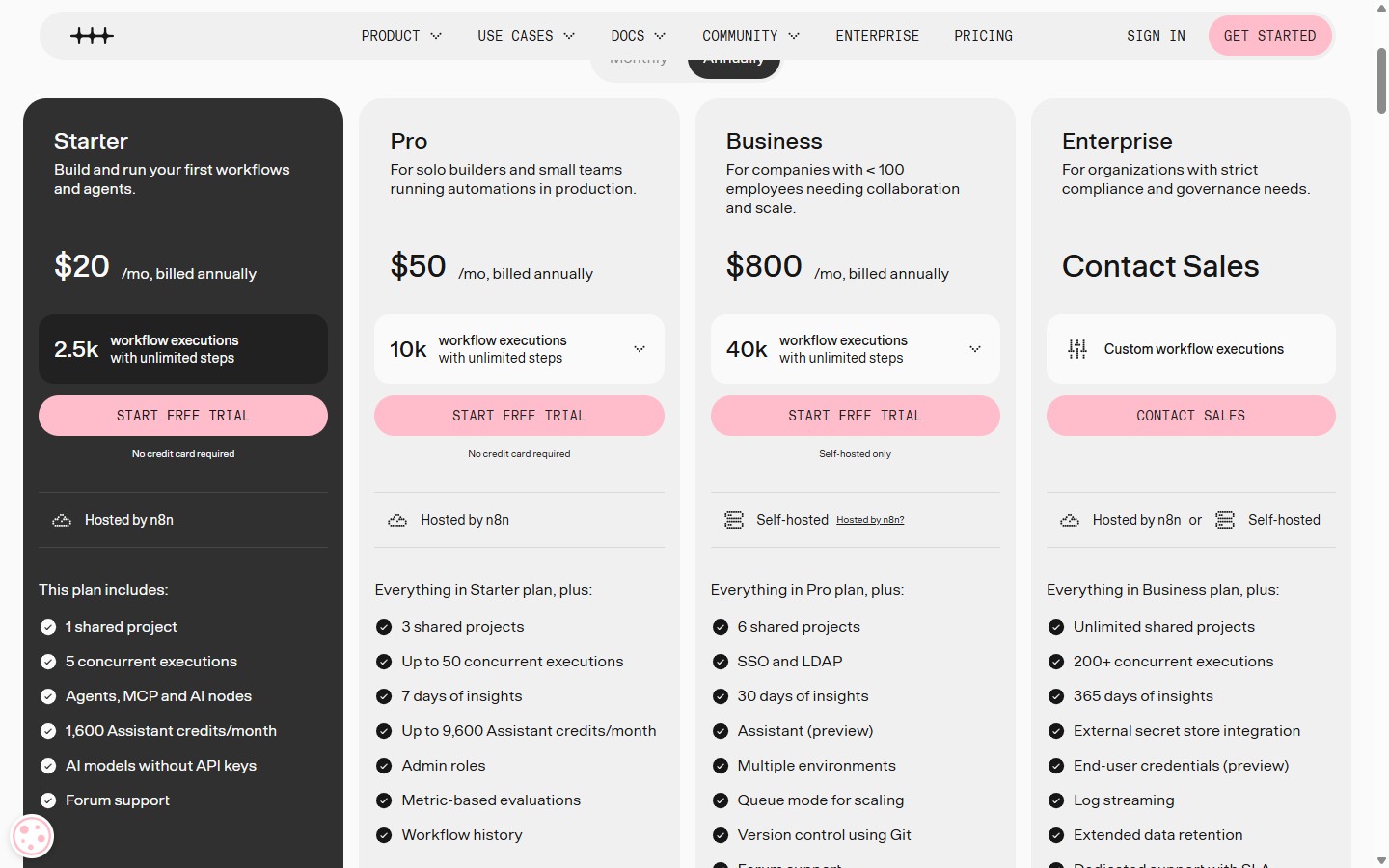 n8n prices by full workflow runs, not by individual steps. Screenshot: n8n.io/pricing, 12 November 2026.
Best for: businesses with long, multi-step automations, or with a developer on hand. Watch out for: self-hosting means someone has to keep the server updated and secure. If nobody will, use the cloud version.
Power Automate: if you already use Microsoft
Microsoft's Power Automate connects most naturally to Outlook, Excel, Teams and SharePoint. According to Microsoft's pricing page, Power Automate Premium costs $15 per user a month, paid yearly, and there is a 30-day free trial.
Best for: offices that already run on Microsoft 365. Watch out for: if most of your tools are Google or WhatsApp-based, the others are usually easier.
Side by side
| Tool | Free option | Paid plans start at | Charged by | Ease for beginners |
|---|---|---|---|---|
| Zapier | 100 tasks/month, two steps | $19.99/month billed yearly | Tasks (each action) | Easiest |
| Make | 1,000 credits/month | See Make's pricing page | Credits (most actions = 1) | Medium |
| n8n | Self-hosted version on GitHub | $20/month billed annually | Executions (full runs) | Hardest |
| Power Automate | 30-day trial | $15/user/month, paid yearly | Per user | Easy if you use Microsoft |
Where the AI actually comes in
None of these tools "thinks" on its own. The AI step is usually a model such as ChatGPT that the tool sends text to and gets text back from: "read this enquiry and tell me what the customer wants", or "draft a polite reminder for this unpaid invoice". All four tools can do this, but the details differ (built-in AI features, or connecting your own AI account), and those details change often. Check what's included in the plan you're considering.
If you're cost-conscious, our breakdown of AI automation for free shows how far the free plans go before you pay.
Our recommendation
For a small business with no technical person: start with Zapier on one automation. If it proves useful and your bill starts climbing, rebuild it in Make. Move to n8n only when you have long automations, high volumes, or a developer.
And remember that the tool is the easy part. The hard part is the thinking in our guide on how to do AI automation for your business: writing the job down, deciding where a human must check, and measuring whether it actually saved time.
If you'd rather skip the trial and error, tell us which job you want off your plate. Our team built every part of TokunboVerify, and we'll pick the tool that fits your budget, not the one that's fashionable.